Free utility for Thunderbird and Betterbird · Windows, macOS and Linux
MailMover
Move just the settings or all of your Thunderbird mail to another PC or to Betterbird in a few steps. It first checks and repairs the profile, then copies, exports or restores it.
Free, no sign-up and no expiry. MailMover works on the Thunderbird profile folder: accounts, saved passwords, address books, filters and mail. It tells you what is wrong, fixes it with a safety copy and takes it where you need it: to another computer, to Betterbird or to another mail program.
Why it exists
MailMover grew out of a real need of the person who developed it: moving just the settings and/or all the mail between different PCs, quickly and comfortably, without copying hidden folders by hand, without setting up every account again and without finding out later that something was left behind.
What it does
Check and fix
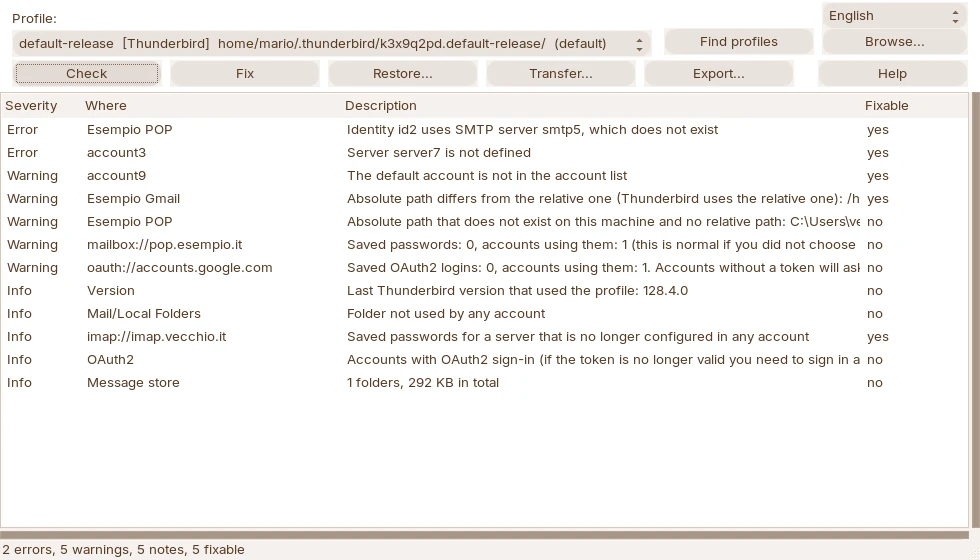
It reads the profile and reports accounts without a server, missing SMTP servers, paths from the old PC, passwords for servers no longer used, very large folders. Fixes are applied with one click, after you have seen the list, and the originals are kept in a safety copy.
Transfer, to Betterbird too
It copies the profile into another profiles folder, for example Betterbird's, and makes it open directly at startup. You can bring just the settings and add the mail later, without touching what you have already done in the new profile.
From one PC to another
Export creates an archive of the profile; on the other computer Restore puts it back in place and fixes the paths from the old PC. It also works between different systems, for example from Windows to Linux, and with archives of tens of GB.
For other programs
It saves the mail as mbox or eml, the address books as vCard and CSV, plus a summary of the account servers: everything you need to move to Outlook, Apple Mail, Gmail, Evolution or KMail.
Settings only or all mail
| Settings only | Settings and all mail | |
|---|---|---|
| Accounts, identities, servers | yes | yes |
| Saved passwords, address books, filters, calendars, add-ons | yes | yes |
| IMAP mail (Gmail, Outlook…) | downloads again from the server | yes |
| POP mail and Local Folders | no, MailMover warns you | yes |
| Space and time | a few MB, right away | as big as the profile |
With Settings only you are up and running at once; whenever you like, Add mail completes the profile without overwriting anything. How it works, in detail
Safe by design
- It does not read or decrypt passwords: of the saved ones it only uses the server name, which is stored in plain text.
- It does not connect to the internet and sends no data to anyone.
- Before every change it shows the list of what it will do and copies the originals to a backup folder.
- The source profile is never modified by Transfer and Export.
- It does not start while Thunderbird or Betterbird have the profile open, so it never works on files in use.
From Thunderbird to Betterbird
Betterbird follows the Thunderbird ESR versions: if your profile comes from a newer Thunderbird, Betterbird usually offers a new, empty profile. MailMover prepares a copy that Betterbird opens directly, including the Flatpak version on Linux, and leaves the Thunderbird profile untouched. Step by step in the guide
How to get it
- Download the version for your system from the download page.
- Close Thunderbird or Betterbird and start MailMover: it finds the profiles by itself.
- Press Check, then choose what to do. The guide is also inside the program (Help button or F1).
MailMover is in Italian and English: change the language from the selector at the top right.
Support
Phone
+39 351 947 4127, on weekdays during office hours